

1) Add Abby to your list of contacts!
If you are in Gmail, here's what you need to do:
Go to one of my messages & hover over my name) & you should see this pop-up window, then click on "Add to Contacts". Click on that & you're good to go!
If you can't find any of my messages, try to search for "abby@englisheverafter.co" in your inbox.
2) Save Abby's message from the filters!
A) Is Abby's email in the spam folder?
1. Please check your spam folder to see if the message has landed there.
2. If the message has been mistakenly marked as Spam by GMAIL, check the box next to my e-mail and click on the button at the top.
B) Is Abby's email in the Promotions tab?
If you are using Gmail's Priority Inbox, your messages will be sorted to different tabs (you can read more about Gmail's options here). Broadcast email such as our weekly member news usually ends up in the Promotions tab because this message is sent to many people at the same time.
1) Please check the other tabs to see if the Weekly Member News is another tab. If it is, simply drag it into the Primary Inbox. Alternatively, you can also right-click and select Move to Tab > Primary.
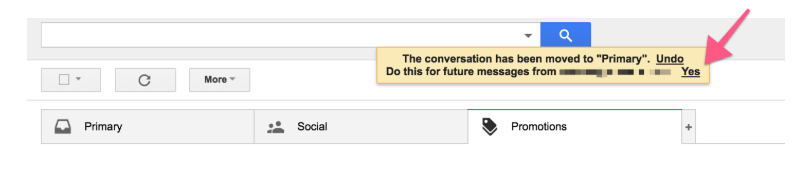
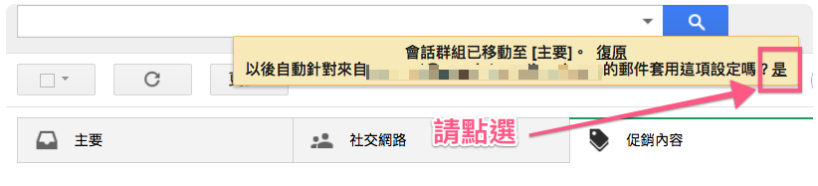
2) You'll see a yellow pop-up message asking if you want to make the change permanent. Click on "Yes".
Here's what that message looks like in English:
Here's what that message looks like in Chinese:
C) Is Abby's email no where to be found?
If you have gone through both option A & B, and the message is still no where in sight, please get in touch with me (the chat bubble should be in the lower right corner of this page)!